
Most account break-ins do not involve clever hacking. They happen because a password was short, reused or easy to guess. Our security tools help with the everyday side of security: creating passwords and PINs that cannot be guessed, and handling the IDs, hashes and encodings that developers work with daily. All six run in your browser, and nothing you generate is sent anywhere[1].
Passwords: length and randomness beat cleverness
The U.S. National Institute of Standards and Technology publishes widely used rules for passwords. Its Digital Identity Guidelines (SP 800-63B) favour long passwords, allow all printable characters and spaces, and recommend checking new passwords against lists of commonly used and breached passwords, rather than forcing arbitrary complexity rules[2]. In practice: make passwords long, random and unique to each account.
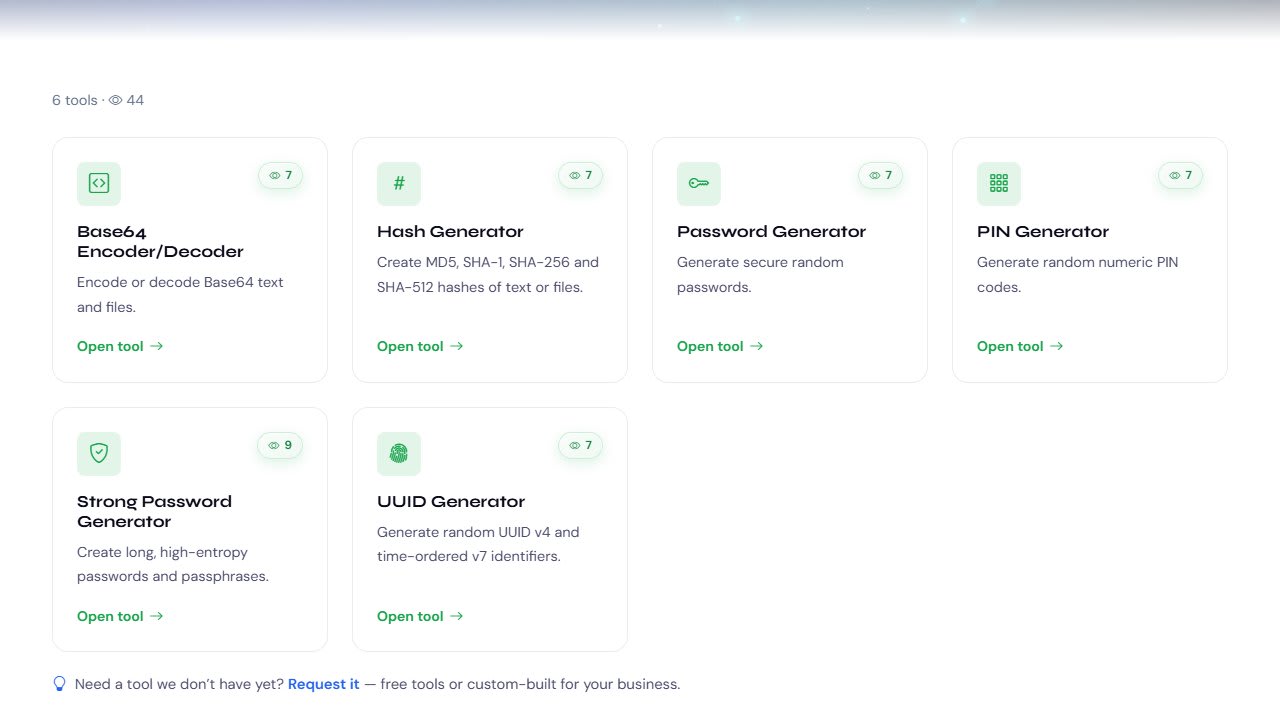
Password Generator creates random passwords of the length and character types you choose. You can exclude look-alike characters such as I, l, 1, O and 0 when you will have to type the password by hand, for example on a TV or router. Passwords are generated with your browser's cryptographically secure random number generator, not a predictable formula.
Strong Password Generator is for the accounts that matter most: your email, banking, password manager and admin logins. It creates very long random passwords, or passphrases made of random words, which are just as hard to crack but much easier to remember and type. It shows five suggestions at a time so you can pick one you like. A passphrase of five or more random words is a good choice for anything you type often.

Two habits matter as much as the password itself: never reuse your email or password-manager password anywhere else, and turn on two-factor authentication for email, banking and social media.
PINs: avoid the patterns everyone uses
People pick predictable PINs: 1234, 0000, 1111 and birth years are among the most common. PIN Generator creates random 4, 6 or 8-digit PINs, one or many at a time, and its "Avoid weak PINs" option skips common patterns automatically. Where you can, use six digits instead of four: there are 100 times more possibilities. Do not use dates, phone numbers or repeated digits.
Tools for developers
UUID Generator creates universally unique identifiers: 128-bit IDs that can be generated anywhere without a central database and still be unique. The current standard, RFC 9562, defines several versions[4]. The tool generates the two most useful ones: version 4 (random), when an ID should reveal nothing, and version 7 (time-ordered), which is the better choice for database primary keys because new IDs sort together and keep indexes efficient. Generate one or up to 1,000 at once, in the format you need, and validate existing UUIDs.
Hash Generator calculates MD5, SHA-1, SHA-256, SHA-384 and SHA-512 fingerprints of text or files at the same time, and checks a hash against an expected value. A tiny change to the input produces a completely different hash, which makes hashes ideal for verifying that a download matches the publisher's checksum. Use SHA-256 or stronger for anything security-related; MD5 and SHA-1 are fine for spotting accidental corruption but not for security. Note that a plain hash is not how passwords should be stored on a server: OWASP's Password Storage Cheat Sheet explains why slow, salted algorithms are used instead[3].
Base64 Encoder/Decoder converts text or files to Base64 and back. Base64 represents binary data using only plain text characters, which is why it appears in data URLs, JSON APIs, email attachments and JWT tokens. It supports Unicode text and the URL-safe variant. Remember that Base64 is an encoding, not encryption: anyone can decode it, so it never protects secrets. It also makes data about 33% larger, so avoid it for large images on websites.
Which tool should you use?
- A new account: Password Generator.
- Email, banking or your password manager: Strong Password Generator (try a passphrase).
- A card, phone or door code: PIN Generator, six digits if allowed.
- Database keys or request IDs: UUID Generator (v7 for keys, v4 for opaque IDs).
- Checking a download: Hash Generator with SHA-256.
- Reading or embedding encoded data: Base64 Encoder/Decoder.
Why browser-only matters for security tools
A password generator that sends passwords to a server defeats its own purpose. Everything these tools create is generated on your device and is never transmitted or stored by us[1]. Copy what you need into your password manager or code, and close the page.
If you only try one tool from this set, make it the Strong Password Generator for your email account. Email is the key to resetting every other password you have.
Sources & References
This article is based on the official material below. Numbers in the text, like [1], link to the matching source.
- Primary
- Supporting
- Supporting
- Supporting
More from What's New

Free AI Writing Tools Guide: Write, Correct, Rewrite and Summarise Text
Draft emails and cover letters, fix grammar, change tone, paraphrase and summarise with our 7 free AI writing tools, and get results you can trust.

Free SEO and Website Tools Guide: Audits, Meta Tags, Robots.txt, Sitemaps, Schema and UTMs
Audit a site, fix meta tags, create robots.txt and sitemaps, add schema, track campaigns with UTM links and find a domain with 9 free tools.
Free Text Tools Guide: Count, Clean, Convert and Sort Text in Seconds
Count words and characters, clean pasted text, convert case, remove duplicate lines and sort lists with 10 free text tools that run in your browser.